

Playbooks capture how your team negotiates: what issues to flag, how to redline them, what fallback positions to offer, and when to escalate. Once configured, Pincites applies these rules consistently across every review.Documentation Index
Fetch the complete documentation index at: https://docs.pincites.com/llms.txt
Use this file to discover all available pages before exploring further.
Why Playbooks Matter
Without playbooks, every contract review starts from scratch. With them, you build on accumulated wisdom:- Institutional Memory - Years of negotiation expertise encoded and accessible
- Consistent Quality - Same high standards applied regardless of reviewer or time pressure
- Faster Reviews - Skip the obvious, focus on what needs attention
- Continuous Improvement - Every negotiation makes your playbook stronger
The review workflow
1. Run the playbook
Open a contract and select your playbook. Before running the playbook, add context that the AI should have before review. You can select quick context options like “high-value deal” that help the AI adjust its review approach. (For example, the review would be more conservative on high-value deals or focus only on critical issues for light-touch reviews.) Then, choose whether to focus the playbook on the entire contact or only on the redlined sections.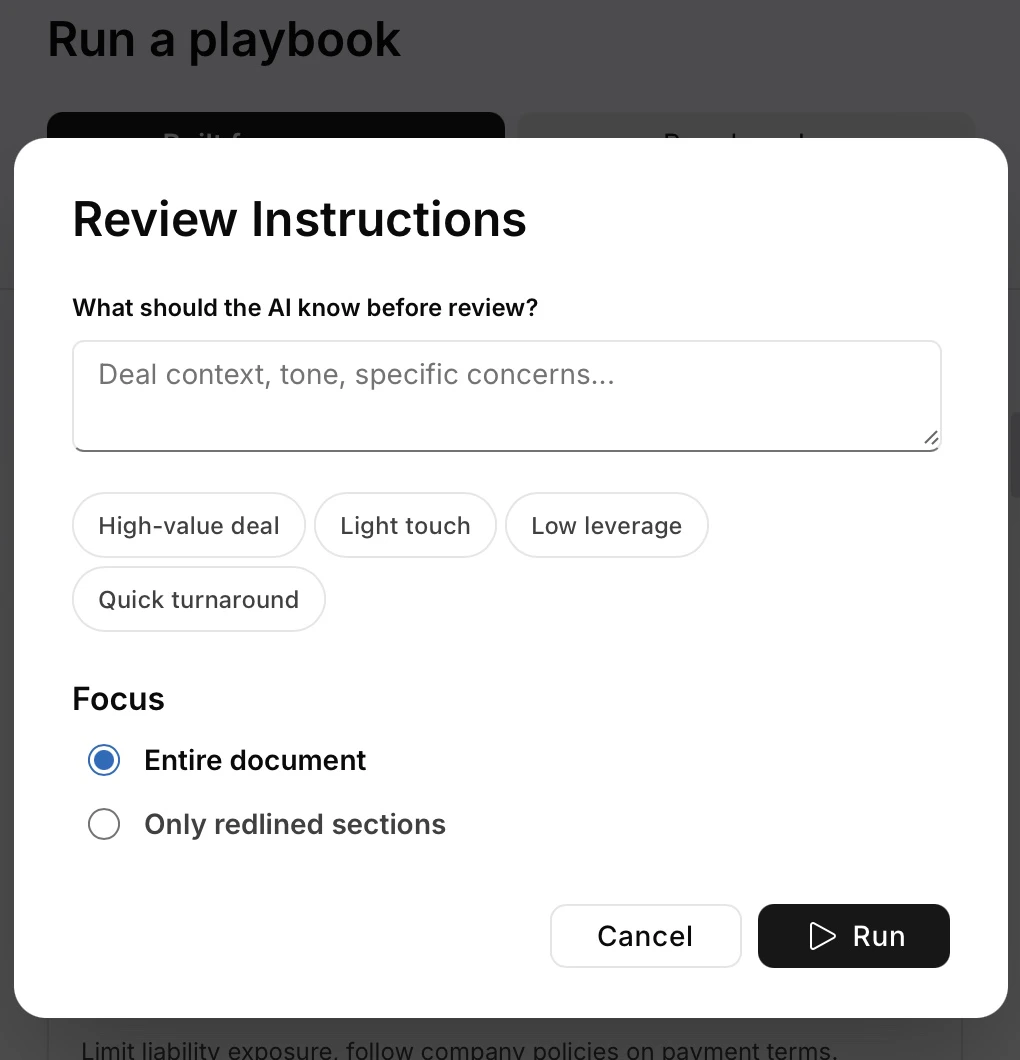
- Provisions that fail your standards
- Missing required terms
- Unusual language needing attention
- Suggested redlines with fallback positions
2. Refine with Composer
Use Composer to adjust for context: Adjust for Leverage3. Handle exceptions
Playbooks cover standard situations. Composer handles the edge cases: Multi-Party Dynamics4. Capture what you learn
Save successful approaches back to your playbook using saved prompts or precedents.Advanced techniques
Layer multiple playbooks
Apply playbooks in sequence for complex deals:- Base commercial terms
- Industry-specific overlay (healthcare, financial services)
- Deal-size exceptions
Compare to market
Test your positions against standards:Mine your precedents
Learn from past negotiations:Keeping playbooks effective
Add context with changes
When you save new fallback language, include why:- When to use it (deal size, counterparty type, leverage situation)
- Why it works (business rationale)
- What you traded for it
Watch for drift
If you’re constantly overriding the same rule, update the playbook. Ad-hoc exceptions shouldn’t become the hidden standard.Review quarterly
Market conditions change. Regulations change. Your risk tolerance changes. Compare your playbook to recent deals and update positions that no longer reflect reality.Measuring impact
Track these to see if your playbook is working:- Review speed: Time from document receipt to first markup
- Consistency: How much positions vary across reviewers
- Acceptance rate: How often counterparties accept your positions
- Issue detection: Problems caught by playbook vs. found manually
- Knowledge Capture: New fallbacks added monthly