Documentation Index
Fetch the complete documentation index at: https://docs.pincites.com/llms.txt
Use this file to discover all available pages before exploring further.
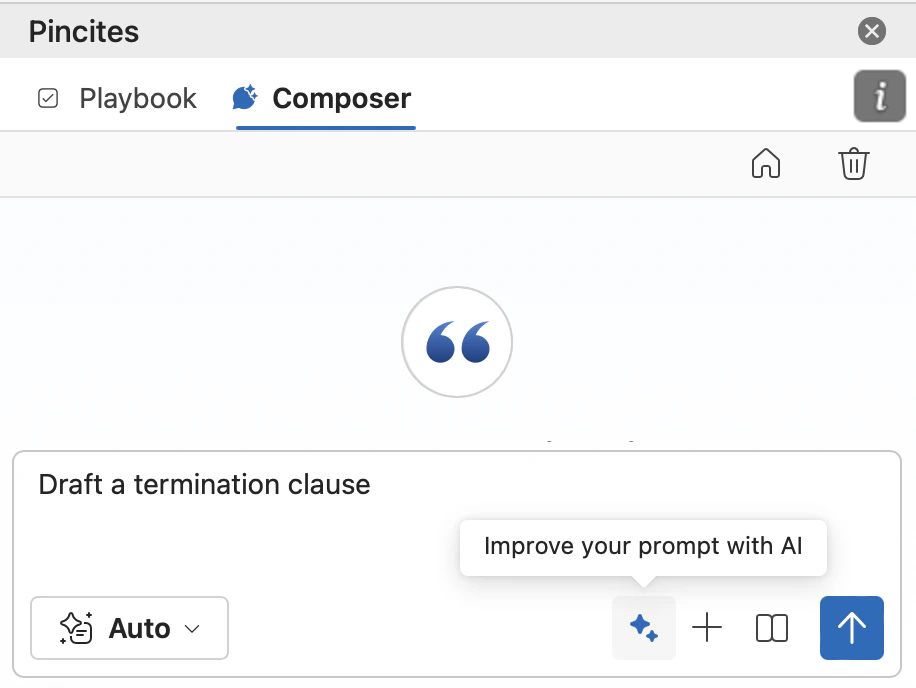
The Prompt Enhancer automatically expands basic requests into structured prompts with context, specificity, and clear output requirements.
How It Works
- Enter your basic request - Write naturally, as you normally would
- Click the Prompt Enhancer button - AI analyzes and expands your input
- Review the enhanced version - Check what was added
- Customize if needed - Add specific context or requirements
- Run or save - Execute immediately or save to your library
What Makes Enhancement Powerful
Before Enhancement
After Enhancement
You are in-house counsel reviewing a software vendor agreement.

Focus Areas:
- Termination clauses and notice requirements
- Indemnification scope and carveouts
- Liability caps and exclusions
- Payment terms and penalties

Deliverables:
1. Five-bullet risk summary
2. Flag non-standard commercial terms
3. Suggest negotiation priorities

Format: Business-friendly language for internal stakeholders
Tips for better enhancement
Start with Clear Intent
The clearer your initial input, the better the enhancement.
| Weak | Strong |
|---|
| Check this | Review vendor MSA for compliance risks |
| Look at the terms | Analyze payment terms against market standards |
Layer Your Context
After enhancement, add your unique situation:
Enhanced prompt: [General review structure]
Your addition: "We're a Series A startup with limited leverage.
This is a critical vendor for our product launch next month."
Use trigger words
Different starting phrases trigger different enhancement styles:
- “Analyze…” → Detailed breakdown with multiple perspectives
- “Summarize…” → Concise extraction of key points
- “Compare…” → Structured comparison framework
- “Draft…” → Creation of specific documents
- “Review for…” → Targeted issue spotting
Combine with Document Context
The enhancer works best when it understands what you’re reviewing:
Upload: [Vendor Agreement]
Prompt: "Review payment terms against market standards"
Enhanced: Full analysis framework with industry benchmarks
Advanced techniques
The Double Enhancement
Run enhancement twice for complex tasks:
- First pass: Basic request → Enhanced prompt
- Second pass: Enhanced prompt → Ultra-specific prompt
Each pass adds another layer of sophistication.
Context Injection
Add context between enhancement and execution:
Step 1: "Review this DPA" → Enhanced
Step 2: Insert: "Healthcare industry, HIPAA applies"
Step 3: Run enhanced + contextualized prompt
Multi-Document Enhancement
For multiple documents, enhance separately then combine:
Doc 1: "Review MSA" → Enhanced for agreements
Doc 2: "Review DPA" → Enhanced for data protection
Combine: Merge both enhanced prompts for comprehensive review
Role Enhancement
Start with a role to shape the enhancement:
"As conservative outside counsel, review this agreement"
→ Enhancement adds risk-averse perspective throughout
Best Practices
Edit, Don’t Accept Blindly
The enhancer provides a framework, but you know your specific needs:
- Remove irrelevant sections
- Add company-specific requirements
- Adjust tone for your audience
- Include deal-specific constraints
Save Enhanced Patterns
When an enhanced prompt works perfectly:
- Save it to your library immediately
- Name it descriptively
- Note what made it effective
- Reuse for similar situations
Test Variations
Try different starting points for the same task:
- “Review this NDA” vs “Analyze confidentiality provisions”
- “Check for risks” vs “Identify deal-breakers”
- “Summarize terms” vs “Extract key obligations”
Different starts yield different useful frameworks.
Build Enhancement Chains
Link enhanced prompts for complex workflows:
Prompt 1: "Identify risks" → Enhanced risk framework
Prompt 2: "Prioritize findings" → Enhanced prioritization
Prompt 3: "Draft response" → Enhanced communication
When Not to Enhance
-
Already Detailed Prompts If you’ve written a comprehensive prompt, enhancement might add noise.
-
Simple Yes/No Questions “Is there a liability cap?” doesn’t need enhancement.
-
Tested Library Prompts Your proven prompts are already optimized.
-
Time-Sensitive Quick Checks When you need a fast answer, skip enhancement overhead.
Quick Fixes
| Issue | Problem | Solution |
|---|
| Too Generic | Enhancement feels boilerplate | Start with more specific initial input |
| Over-Enhanced | Prompt becomes too complex | Trim unnecessary sections post-enhancement |
| Wrong Focus | Enhancement emphasizes wrong areas | Guide with keywords in initial prompt |
| Missing Context | Enhancement lacks industry/role specifics | Add your unique context after enhancement |
Power keywords
| Type | Keywords |
|---|
| Urgency | Critical, urgent, time-sensitive |
| Scope | Comprehensive, quick, high-level |
| Audience | For board, for legal team, for business |
| Format | Table format, executive brief, checklist |
Remember
The enhancer is a starting point, not an endpoint. Use it to quickly build a solid foundation, then add your expertise and context to create prompts that deliver exactly what you need.
Great prompts combine AI enhancement with human judgment. Let the enhancer handle the structure while you provide the strategy.
